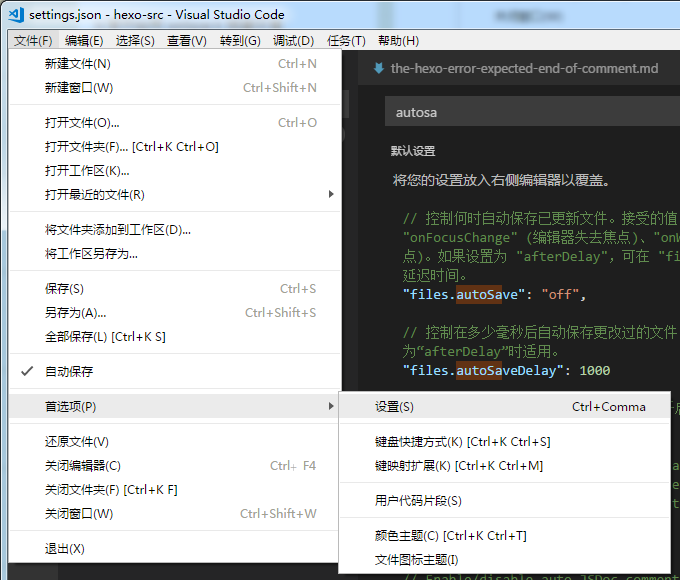
首先打开用户设置:
通过 git reset 和 git checkout 进行版本回退之后再次 git pull 抛出以下错误:
|
1 2 3 4 5 |
You are not currently on a branch. Please specify which branch you want to merge with. See git-pull(1) for details. git pull <remote> <branch> |
意思是当前的版本已经不在 master 分支了,解决的办法: git status 查看所有变化的文件,把有改动的先删除。 git chec ... 阅读更多
使用 hexo generate 命令时报错:
|
1 2 3 4 5 6 7 8 9 10 11 12 13 14 15 16 17 18 19 20 21 22 23 24 |
INFO Start processing FATAL Something's wrong. Maybe you can find the solution here: https://hexo.io/docs/troubleshooting.html Template render error: Error: expected end of comment, got end of file at Object._prettifyError (/web/hexo/node_modules/nunjucks/src/lib.js:35:11) at Template.render (/web/hexo/node_modules/nunjucks/src/environment.js:526:21) at Environment.renderString (/web/hexo/node_modules/nunjucks/src/environment.js:364:17) at /web/hexo/node_modules/hexo/lib/extend/tag.js:66:9 at Promise._execute(/web/hexo/node_modules/bluebird/js/release/debuggability.js:303:9) at Promise._resolveFromExecutor (/web/hexo/node_modules/bluebird/js/release/promise.js:483:18) at new Promise (/web/hexo/node_modules/bluebird/js/release/promise.js:79:10) at Tag.render (/web/hexo/node_modules/hexo/lib/extend/tag.js:64:10) at Object.tagFilter [as onRenderEnd] (/web/hexo/node_modules/hexo/lib/hexo/post.js:266:16) at /web/hexo/node_modules/hexo/lib/hexo/render.js:65:19 at tryCatcher (/web/hexo/node_modules/bluebird/js/release/util.js:16:23) at Promise._settlePromiseFromHandler (/web/hexo/node_modules/bluebird/js/release/promise.js:512:31) at Promise._settlePromise (/web/hexo/node_modules/bluebird/js/release/promise.js:569:18) at Promise._settlePromise0 (/web/hexo/node_modules/bluebird/js/release/promise.js:614:10) at Promise._settlePromises (/web/hexo/node_modules/bluebird/js/release/promise.js:693:18) at Async._drainQueue (/web/hexo/node_modules/bluebird/js/release/async.js:133:16) at Async._drainQueues (/web/hexo/node_modules/bluebird/js/release/async.js:143:10) at Immediate.Async.drainQueues [as _onImmediate] (/web/hexo/node_modules/bluebird/js/release/async.js:17:14) at runCallback (timers.js:794:20) at tryOnImmediate (timers.js:752:5) at processImmediate [as _immediateCallback] (timers.js:729:5) |
数组的声明有以下几种方式:
arr[0]="0" arr[1]="1" arr[2]="2"declare -a arr2arr3=("1" "2" "3")arr4="1 2 3"arr5=([0]="0" [1]="1" [2]="2")引号空格法在某些时候可能会引起错误,更常用小括号空格法。
遍历数组有两种方式,一种是标准的 for 循环,一种是 for..in 形式。
|
1 2 3 4 5 6 7 8 9 10 11 12 13 14 15 16 |
#! /bin/bash arr1=(1 2 3) # 使用标准 for 循环 for ((i = 0; i < ${#arr1[@]}; i++)) do echo ${arr1[$i]} done echo "-------" # for..in for i in ${arr1[@]} do echo $i done |
astyle 是一个代码格式化工具,为 C,C++,JAVA 等语言提供代码格式化功能。
官方描述为:Artistic Style is a source code indenter, formatter, and beautifier for the C, C++, C++/CLI, Objective‑C, C# and Java programming languages.
相关页面:官方地址,文档地址,下载页面(当前最新版本位 3.1) 。
安装可参考官方安装文档,提供了多种方式编译安装,这里使用 cmake 。
|
1 2 3 4 5 6 7 8 9 10 |
# 解压 tar -zxvf astyle_3.1_linux.tar.gz cd astyle # 创建编译文件夹 mkdir as-gcc-exe cd as-gcc-exe cmake .. # 编译和安装 make make install |
默认情况下,可执行文件被安装在/usr/bin,文档放在/usr/share/doc/astyle,安装完成后直接就可使用 astyle 命令。
官方并没有提供 make uninstall 卸载的功能,如需卸载需要在编译目录下执行 xargs rm < install_manifest.txt 。
xargs 命令是给其他命令传递参数的一个过滤器,也是组合多个命令的一个工具。它擅长将标准输入数据转换成命令行参数,xargs 能够处理管道或者 stdin 并将其转换成特定命令的命令参数。
xargs 也可以将单行或多行文本输入转换为其他格式,例如多行变单行,单行变多行。 xargs 的默认命令是 echo,空格是默认定界符。这意味着通过管道传递给 xargs 的输入将会包含换行和空白,不过通过 xargs 的处理,换行和空白将被空格取代。 xargs 是构建单行命令的重要组件之一。
xargs 用作替换工具,读取输入数据重新格式化后输出。-n 选项指定换行,-d 选项指定分隔符。
|
1 2 3 4 5 6 7 8 9 10 11 12 |
ma@ubuntu:/tmp$ cat tmp # 测试文本内容 a b c d e f gh i jkl ma@ubuntu:/tmp$ cat tmp | xargs # 重新格式化输出 a b c d e f gh i jkl ma@ubuntu:/tmp$ cat tmp | xargs -n 3 # 每三个换行 a b c d e f gh i jkl ma@ubuntu:/tmp$ echo "abcXdefXghiXjkl" | xargs -n3 -dX # 以字符 X 分隔,每三个换行 abc def ghi jkl |
find 命令用来在指定目录下查找文件,任何位于参数之前的字符串都将被视为欲查找的目录名。如果使用该命令时,不设置任何参数,则 find 命令将在当前目录下查找子目录与文件,并且将查找到的子目录和文件全部进行显示。
查找的基本语法为:find dir [options] expression,在 dir 目录查找符合 expression 的文件,默认会递归查找。
-name filename:直接查找该文件名的文件。-type filetype:通过文件类型查找文件。文件类型包括:f:普通文件 b:块设备文件 c:字符设备文件 d:目录 l:链接文档 s:套接字文件|
1 2 3 4 5 6 7 8 9 10 11 12 13 14 15 16 17 18 19 20 21 22 |
# 查找当前目录下以.tar.gz 结尾的名字 ma@ubuntu:/data/software$ find . -name "*.tar.gz" ./pip-9.0.1.tar.gz ./php-5.6.33.tar.gz ./node-v9.4.0-linux-x64.tar.gz ./LuaJIT-2.0.5.tar.gz ./mysql-5.6.38-linux-glibc2.12-x86_64.tar.gz ./go1.10.1.linux-amd64.tar.gz ./gcc-centos6.tar.gz ./cmake-3.11.0-rc3.tar.gz # 查找当前目录下的所有文件夹,不递归查询 [ma@ma software]$ find . -maxdepth 1 -type d ./gcc-7.2.0 ./go1.4 ./setuptools-36.5.0 ./lua-5.3.4 ./openssl-1.0.2l ./build ./zlib-1.2.11 ./vim ./gdb-8.1 |
插件需要 node.js 环境支持,安装插件前先安装 node.js 。 安装完成后通过 Ctrl+Shift+P-install package 打开插件安装页面,输出 html-css-js prettify 查询插件安装。 安装完成后通过右键-HTML/CSS/JS Prettify 格式化代码。
通过快捷键 Ctrl+`打开控制面板,根据版本输入以下代码回车:
|
1 |
import urllib2,os,hashlib; h = '6f4c264a24d933ce70df5dedcf1dcaee' + 'ebe013ee18cced0ef93d5f746d80ef60'; pf = 'Package Control.sublime-package'; ipp = sublime.installed_packages_path(); os.makedirs( ipp ) if not os.path.exists(ipp) else None; urllib2.install_opener( urllib2.build_opener( urllib2.ProxyHandler()) ); by = urllib2.urlopen( 'https://packagecontrol.io/' + pf.replace(' ', '%20')).read(); dh = hashlib.sha256(by).hexdigest(); open( os.path.join( ipp, pf), 'wb' ).write(by) if dh == h else None; print('Error validating download (got %s instead of %s), please try manual install' % (dh, h) if dh != h else 'Please restart Sublime Text to finish installation') |